.
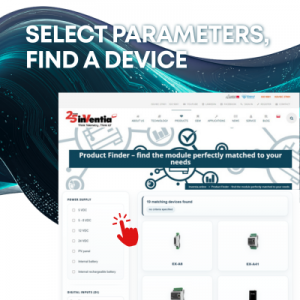
Which module should you choose? – How to select a telemetry device for your project in just a few steps
Imagine you’re facing a new project: you need to equip a heating chamber with a telemetry device. You need to measure temperature, flow, or pressure, transmit data to a central system, select the appropriate communication method, and the entire setup must operate on the specific power supply available at the facility.
Sounds simple? On paper, maybe. In practice, selecting a telemetry device requires comparing many parameters: power supply type, number of inputs and outputs, available communication ports, modem type, and additional features. With several device families available, it’s easy to overlook a crucial detail and choose a model that doesn’t meet all the application’s requirements.
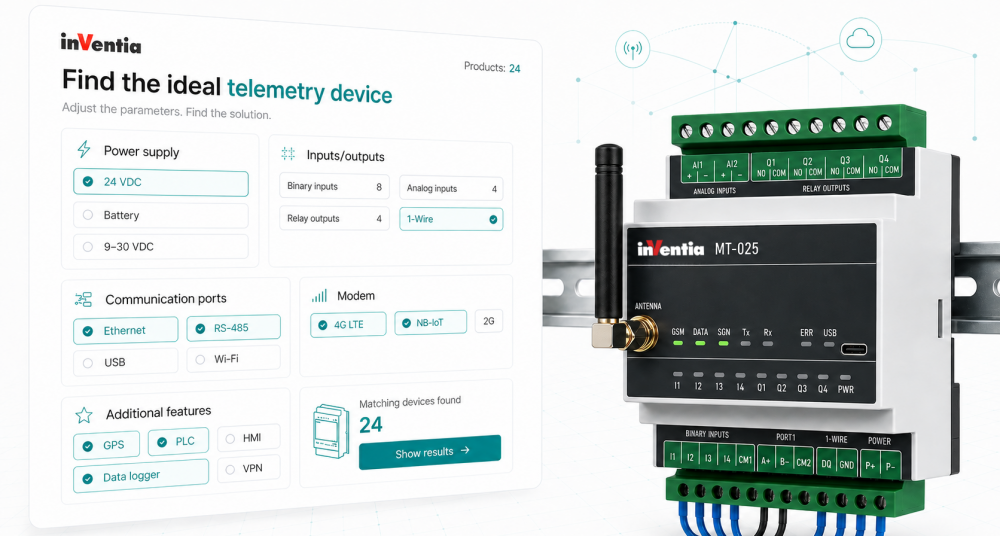
This is where the Inventia Product Finder comes in—a tool that allows you to quickly narrow down the list of devices to the models best suited to your project’s parameters
Step by step—how the product finder works
Power supply type
The first step is to select the power source available at the site. The finder allows you to specify, among others
- 5 VDC,
- 5–8 VDC,
- 12 VDC,
- 24 VDC,
- PV solar panel,
- internal battery,
- internal rechargeable battery.
This allows you to filter out devices that do not meet the power supply conditions of a given installation right from the start.
Number of inputs/outputs and their type
Next, the user specifies the required number of inputs and outputs. The search tool takes into account:
- binary inputs (DI),
- binary outputs (DO),
- analog inputs (AI),
- analog outputs (AO),
- Pt1000 inputs designed, among other things, for temperature measurement.
This is particularly important in measurement and control applications, where the device must handle a specific number of signals from the facility.
Communication ports
The next step is selecting the required communication interfaces. The search tool allows you to select:
- an Ethernet port,
- a 1-Wire port,
- the required number of serial ports.
This allows you to select a model compatible with the existing communication infrastructure and devices operating in the installation.
Modem
In the modem section, the user can specify the supported data transmission technology. Available options include:
- 2G,
- 3G,
- 4G,
- 4G NB-IoT,
- 4G Cat.M1.
This allows the device to be tailored to the project’s communication requirements and the availability of a given transmission technology at the installation site.
Additional features
The search tool also allows you to select additional features, such as:
- Data logger – allows measurements and events to be saved locally, ensuring data continuity even in the event of communication interruptions.
- Internal PLC user program – enables the implementation of local control logic without the need for an additional controller.
- GPS – supports device location and can be important in distributed or mobile applications.
- Built-in HMI display – facilitates local viewing of data and device status without the need for additional software.
Based on the selected parameters, the search tool displays the models best suited to the project’s requirements. You can then compare available devices, view the details of a selected model, and contact Inventia regarding selection or ordering.
Problem solved in practice
Let’s return to the example of the heating chamber. The installer does not need to know all the models or manually analyze numerous data sheets. In the search engine, they can specify, for example:
- power supply: 24 VDC,
- inputs/outputs: 2 analog inputs (AI) and 1 PT1000 input,
- ports: serial port required,
- functionality: data logger,
- modem: 4G.
After selecting the parameters, the system narrows down the list to the devices that best meet the specified requirements. The user can then compare the available models, check their details, and go to the product page.
In larger systems where additional communication ports, PLC functions, data logging, or specific transmission technology are important, the search tool helps you quickly move from application requirements to a shortlist of suitable devices.
Why is the search tool so useful?
Time savings
In the initial project phase, there is no need to manually compare all technical specifications. Simply specify the key requirements.
Easier device selection
The search tool filters Inventia solutions based on technical and functional parameters, reducing the risk of overlooking a critical feature.
Intuitive operation
The tool guides the user through the most important selection criteria: power supply, inputs/outputs, communication ports, modem, and additional features.
Ability to compare models
After viewing the results, the user can check the details of available devices and compare their features and interfaces.
Purchase support
For each model, users can contact Inventia, making it easy to confirm their selection, ask additional questions, or place an order.
Selecting the right telemetry device doesn’t have to be complicated. Inventia’s product search tool guides the user from specifying the power supply type and number of inputs/outputs, through selecting communication ports, modems, and additional features, all the way to a list of models best suited to the project’s requirements.
This tool is designed for both experienced engineers and those just starting to work with telemetry systems. It allows you to focus on application requirements rather than manually reviewing numerous technical parameters.
Q&A – Frequently Asked Questions About the Product Finder
1. What is the Inventia Product Finder?
It is a tool that helps you select a telemetry device to meet your project requirements. The user specifies key parameters, such as power supply, number of inputs and outputs, communication ports, modem, and additional features, and the search engine displays the best-matched models.
2. Do I need to know all Inventia models to use the search tool?
No. The search tool is designed to make it easy to select a device without needing prior knowledge of the entire product line. Simply enter the ranges of your requirements. You don’t have to specify all of them at once; you can select just one.
3. What parameters can be specified in the search tool?
You can specify the power supply type, required inputs and outputs, communication ports, modem type, and additional features such as a data logger, internal PLC user program, GPS, or built-in HMI display.
4. Does the search tool support Pt1000 inputs?
Yes. The search tool allows you to specify the need for Pt1000 inputs, which are used, among other things, for temperature measurement.
5. Does the search tool check available data transmission technologies?
Yes. In the “Modem” section, you can select technologies such as 2G, 3G, 4G, 4G NB-IoT, and 4G Cat.M1.
6. What happens after selecting the parameters?
The system displays the models best suited to the selected requirements. You can compare available devices, view details of a selected model by clicking on it, or contact Inventia.
7. Is the search tool suitable for both simple and more complex installations?
Yes. The tool can be used for both simple measurement applications and more complex projects requiring specific communication ports, PLC functions, data logging, or a specific transmission technology.
Share this article:



Read more articles:

Why does “cheaper” often mean “more expensive”? A look at telemetry through an investor’s eyes
Check out the article written by Inventia’s COO, Tomasz Tokarski
Don’t water by feel. Start managing water with the Agreus system
Find out how to turn intuition into proven data and optimal irrigation